Issue tracker, Foldkit
The same issue tracker with a Foldkit frontend. Each read of the durable stream becomes a Message, and update owns the rows and the optimistic writes.
This variant of the issue tracker keeps the server, the wire contract and the stylesheet. Only the browser code changes. The product is the same: projects, issues, comments, a status filter with counts, a display name, shared workspaces and the work-in-progress rule. Your own change still shows at once, faded, and turns solid when its txid arrives on the stream.
Foldkit is a TypeScript framework on Effect. It uses the Elm architecture. The whole page state is one Model. Everything that happens is a Message. One pure function, update, takes the Model and a Message and returns the next Model and a list of Commands. Commands and subscriptions do the side effects, and each result comes back as a Message. The view is a function of the Model.
This page shows how a durable stream fits that loop. A subscription reads the workspace stream, and each read batch becomes a Message. update folds the changes into the Model, so it is the materializer. The same function adds each optimistic write and removes it when the stream confirms it or the server refuses it.
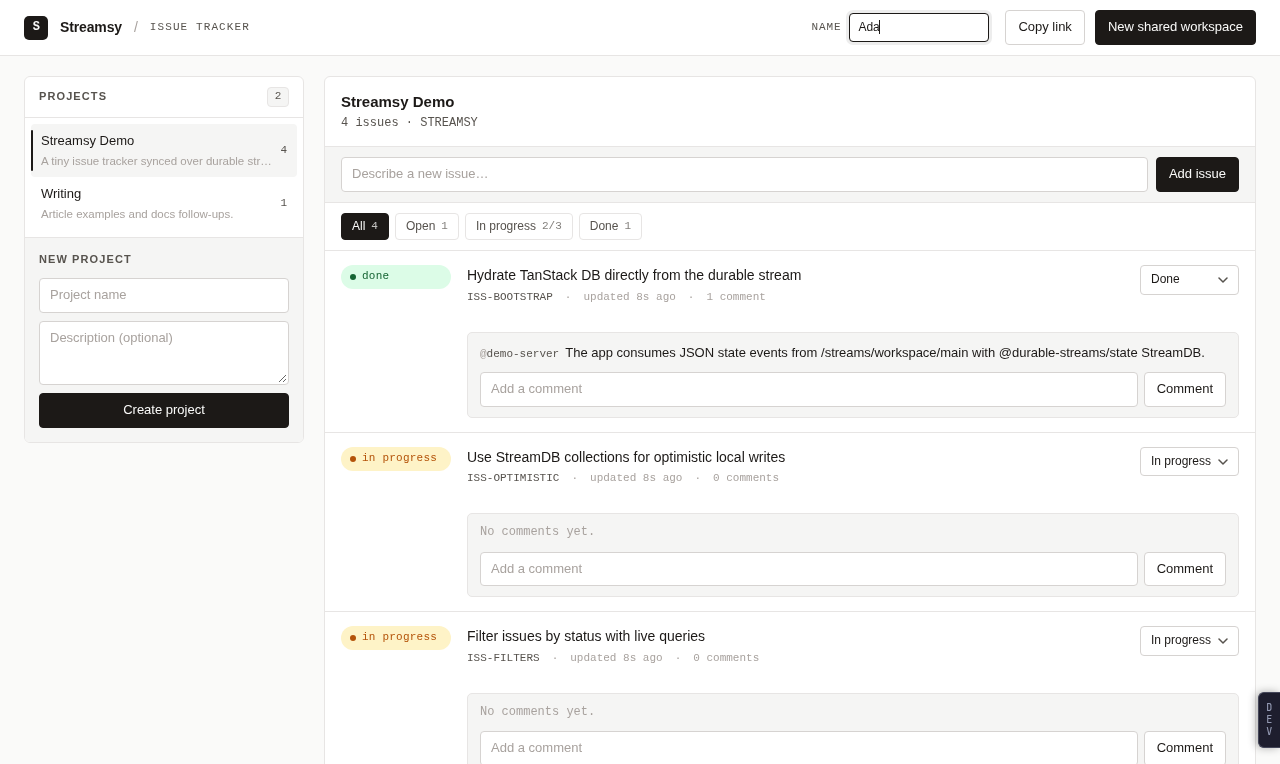
The source is in examples/issue-tracker-demo-foldkit. It imports the wire contract from examples/issue-tracker-demo-contract, and the stylesheet and format helpers from the base app. Excerpts from those packages have titles that start with the package folder name.
Run it
The page is a Vite app. The base app's server answers /api and /streams. Run each in its own terminal, from the repository root:
bun install --frozen-lockfile
bun run build
bun run --cwd examples/issue-tracker-demo-foldkit dev:api
bun run --cwd examples/issue-tracker-demo-foldkit dev
Open http://localhost:1338. dev:api starts the base server on port 1339, with the base app's settings. Set ISSUE_TRACKER_DB to a SQLite file path to keep workspaces across restarts. Set ISSUE_TRACKER_API to send the proxy to a different server.
| Variable | Default | Meaning |
|---|---|---|
ISSUE_TRACKER_API | http://localhost:1339 | The server that Vite sends /api and /streams to |
ISSUE_TRACKER_DB | unset | For dev:api: SQLite file for the workspaces; unset keeps memory |
To see a rollback, open the page in two tabs. In "Streamsy Demo", move a different open or done issue to "In progress" in each tab at about the same time. One change stays. The other tab shows its change faded for a moment, then removes it and shows the server's message.
bun run --cwd examples/issue-tracker-demo-foldkit build writes the page to dist/. preview serves dist/ on port 1338 with the same proxy.
What changes
| Concern | Base app | This variant |
|---|---|---|
| Stream reader | createStreamDB from @durable-streams/state | A subscription over stream() from @durable-streams/client |
| Rows in memory | TanStack DB collections | Records in the Model, changed only by update |
| Optimistic writes | onMutate, mutationFn and awaitTxId | A list of pending writes in the Model, cleared by txid |
| Rollback | TanStack DB removes the local row | update removes the pending write |
| Ids, txids, times | Made in the component | Made by a Command, because update is pure |
| Derived lists | Live queries | Pure functions that the view calls |
| Rendering | React components | One view function with HtmlBuilder, same markup and classes |
| Server | server/ | The base app's server. Vite serves the page and proxies to it |
| Tests | Bun tests of the queries and the client | Foldkit story and scene tests in Vitest with happy-dom |
The stream route, the JSON API, the status codes and the rules are the base app's. A 422 still means that the work-in-progress rule refused the change. A 409 still means that the write lost the race on every retry.
Architecture
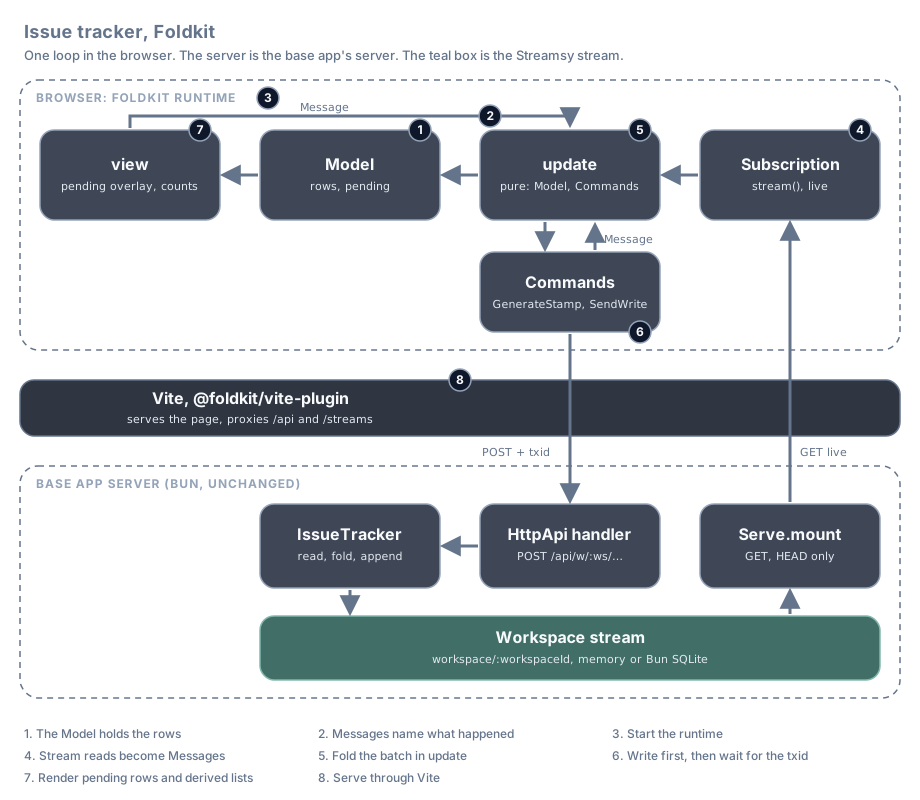
The browser writes through the JSON API and reads from the stream, as in the base app. Each number in the diagram is also the number of a section below.
| Step | What happens | Foldkit feature | File |
|---|---|---|---|
| 1 | The Model keeps the stream rows and the pending writes apart | Schema Model | src/model.ts, src/domain/workspace.ts |
| 2 | Each user action, stream read and Command result is a Message | defineMessageUnion | src/message.ts |
| 3 | The page reads its Flags and starts the runtime with the browser services | Runtime.makeApplication, resources | src/entry.ts, src/resources.ts |
| 4 | A subscription reads the State stream, and each batch becomes a Message | Subscription.make | src/subscription.ts |
| 5 | update folds the batch into the rows and confirms pending writes by txid | update, modifyFields | src/update.ts, src/domain/workspace.ts |
| 6 | A Command makes the stamp, the write shows as pending, another Command posts it | Command.define | src/update.ts, src/command.ts |
| 7 | The view lays the pending writes over the rows and derives the lists | view, HtmlBuilder | src/view/, src/domain/workspace.ts |
| 8 | Vite serves the page and proxies to the base app's server | @foldkit/vite-plugin | vite.config.ts |
The code in each section is from the demo. Lines marked // ... are left out.
1. The Model holds the rows
The Model is an Effect schema. It holds the rows as the stream has them, and the local writes that wait for their txid, in two separate fields. It also holds the form fields, the selected project and filter, the notices and the connection state.
export const Model = Schema.Struct({
  workspaceId: Schema.String,
  /** The name this browser writes with. Empty means anonymous. */
  displayName: Schema.String,
  sync: Sync,
  /** Whether the last stream read reached the server. */
  isOnline: Schema.Boolean,
  /** The rows as the stream has them. */
  rows: Rows,
  /** Local changes that wait for their txid on the stream. */
  pending: Schema.Array(PendingWrite),
  // ...
  notices: Schema.Array(Notice),
  // ...
});
Rows keeps one record for each collection of the workspace stream, by key. The row schemas are Project, Issue and Comment from the contract package, the same schemas that the server writes with.
export const Rows = Schema.Struct({
  projects: Schema.Record(Schema.String, Project),
  issues: Schema.Record(Schema.String, Issue),
  comments: Schema.Record(Schema.String, Comment),
});
A pending write is a txid and the change that the user made. The row values carry local times, so a new row sorts at once.
export const Write = defineTaggedUnion({
  CreateProject: { project: Project },
  CreateIssue: { issue: Issue },
  UpdateIssue: {
    issueId: Schema.String,
    patch: IssuePatch,
    updatedAt: Schema.String,
    updatedBy: Schema.optionalKey(Schema.String),
  },
  CreateComment: { comment: Comment },
});
// ...
export const PendingWrite = Schema.Struct({ txid: Schema.String, write: Write });
The Model is plain data with a schema. So the Vite plugin can keep it across a reload, and the DevTools can show it.
2. Messages name what happened
Every Message is a fact in the past tense. The stream reader sends three of them. The forms send one for each field and submit. Each Command result is a Message too, so a write is a short chain of Messages.
export const Message = defineMessageUnion({
  // The workspace stream. Each batch the reader gets becomes one Message.
  ReceivedStateBatch: { changes: Schema.Array(StateEvent), isUpToDate: Schema.Boolean },
  ChangedConnection: { isOnline: Schema.Boolean },
  FailedReadWorkspace: { error: Schema.String },
  // ...
  // Optimistic writes: stamp, show as pending, send, then wait for the txid.
  CompletedGenerateStamp: { intent: Intent, stamp: Stamp },
  SucceededSendWrite: { txid: Schema.String },
  FailedSendWrite: { txid: Schema.String, error: Schema.String },
  CompletedWaitBeforeNoticeDismissal: { noticeId: Schema.Int },
  // ...
});
StateEvent is the contract's schema for one change event on the workspace stream. The stream items in a Message are decoded values, so update never sees raw JSON.
3. Start the runtime
entry.ts reads the Flags before the first render: the workspace id from ?w= and the saved display name. A new workspace is a new page load, as in the base app. Then it starts the Foldkit runtime with the Model schema, init, update, view, the subscriptions and the browser services.
/** Read once per page load: switching workspace is a full navigation. */
const flags = Effect.gen(function* () {
  const workspaceId = yield* Effect.sync(() => workspaceFromSearch(window.location.search));
  const displayName = yield* readDisplayName;

  return { workspaceId, displayName };
});

const application = Runtime.makeApplication({
  Model,
  Flags,
  init,
  update,
  view,
  subscriptions,
  resources,
  container: document.getElementById("root"),
  devTools: { Message },
});

Runtime.run(application, { flags });
resources is one Effect Layer. The runtime builds it once and gives it to every Command. So a Command asks for HttpClient or Crypto and does not provide it.
export const resources = Layer.mergeAll(
  Http.layer,
  BrowserCrypto.layer,
  BrowserKeyValueStore.layerLocalStorage,
  Clipboard.layer,
);
init gives the first Model. The page starts in Sync.Loading, with no rows and no pending writes.
4. Stream reads become Messages
A Foldkit subscription maps the Model to its dependencies, and the dependencies to a stream of Messages. The runtime opens the stream again only when the dependencies change. Here the only dependency is the workspace id, so the reader opens once for each page load.
export const subscriptions = Subscription.make<Model, Message>()((entry) => ({
  workspaceStream: entry(
    { workspaceId: Schema.String },
    {
      modelToDependencies: (model) => ({ workspaceId: model.workspaceId }),
      dependenciesToStream: ({ workspaceId }) => workspaceMessages(workspaceId),
    },
  ),
}));
The reader is the Durable Streams TypeScript client. It reads from the start, then follows the stream live. acquireRelease cancels the read when the runtime closes the subscription. The wrapped fetch sends ChangedConnection when the server stops or starts answering, so the "Offline" badge works as in the base app.
    return Effect.gen(function* () {
      // ...
      const response = yield* Effect.acquireRelease(
        Effect.tryPromise({
          try: (signal) =>
            stream<JsonValue>({
              url,
              live: true,
              json: true,
              signal,
              warnOnHttp: false,
              fetch: trackedFetch((isOnline) => offer(Message.ChangedConnection({ isOnline }))),
            }),
          catch: () => "Unable to open the workspace stream",
        }),
        (opened) => Effect.sync(() => opened.cancel()),
      );

      response.subscribeJson<JsonValue>((batch) => offer(batchMessage(batch)));
batchMessage decodes each item with the contract's StateEvent schema. One read batch is one Message.
export const batchMessage = (batch: JsonBatch<JsonValue>): Message =>
  Message.ReceivedStateBatch({
    changes: Array.filterMap(batch.items, (item) => decodeChange(item)),
    isUpToDate: batch.upToDate,
  });
See Read over HTTP and Protocol routes.
5. Fold the batch in update
update applies the changes to the rows. A change that carries the txid of a pending write confirms that write, so the write leaves the pending list. The page leaves its loading state at the first batch that is up to date, as preload does in the base app.
    ReceivedStateBatch: ({ changes, isUpToDate }) => {
      const confirmed = confirmedTxids(changes);

      return {
        model: modifyFields(model, {
          rows: (rows) => applyChanges(rows, changes),
          // A change with a write's txid confirms it. The stream row now holds
          // the server's version, so the local one can go.
          pending: Array.filter(({ txid }) => !Array.contains(confirmed, txid)),
          sync: (sync) => (isUpToDate ? Sync.Live() : sync),
        }),
      };
    },
applyChanges is the fold. It is a pure function over plain records, the same work that createStreamDB does for TanStack DB in the base app. An upsert sets the row and a delete removes it.
const put = <A>(
  rows: Record.ReadonlyRecord<string, A>,
  key: string,
  operation: "delete" | "upsert",
  value: A | undefined,
) => {
  if (operation === "delete") return Record.remove(rows, key);

  return value === undefined ? rows : Record.set(rows, key, value);
};

/** Apply a batch of changes in stream order. */
export const applyChanges = (rows: Rows, changes: ReadonlyArray<StateEvent>): Rows =>
  Array.reduce(changes, rows, applyChange);
6. Write first, then wait for the txid
update is pure, so it cannot make ids, txids or times. A submit returns a GenerateStamp Command with the user's intent. An intent is the change without ids or times.
export const GenerateStamp = Command.define("GenerateStamp", {
  args: { intent: Intent },
  messages: [Message.CompletedGenerateStamp],
  execute: ({ intent }) =>
    Effect.gen(function* () {
      const crypto = yield* Crypto.Crypto;
      const entropy = yield* crypto.randomUUIDv4();
      const txid = yield* crypto.randomUUIDv4();
      const at = DateTime.formatIso(yield* DateTime.now);

      return Message.CompletedGenerateStamp({ intent, stamp: { entropy, txid, at } });
    }).pipe(Effect.orDie),
});
When the stamp comes back, update adds the pending write and returns a SendWrite Command. The browser still picks the row id and the txid, as in the base app, so the pending row and the stream row have the same key. API success changes nothing. Only the txid on the stream confirms a write.
    CompletedGenerateStamp: ({ intent, stamp: generated }) => {
      const pending = toPendingWrite(intent, generated, writerOf(model));

      // A new project is selected at once. If the server refuses it, the
      // selection falls back to the first project.
      const maybeNewProjectId = Write.matchOrElse(
        pending.write,
        { CreateProject: ({ project }) => Option.some(project.id) },
        () => model.maybeSelectedProjectId,
      );

      return {
        model: modifyFields(model, {
          pending: Array.append(pending),
          maybeSelectedProjectId: () => maybeNewProjectId,
        }),
        commands: [SendWrite({ workspaceId: model.workspaceId, pending })],
      };
    },

    // The row stays pending until its txid arrives on the stream.
    SucceededSendWrite: () => ({ model }),

    FailedSendWrite: ({ txid, error }) => {
      const noticeId = model.nextNoticeId;

      return {
        model: modifyFields(model, {
          pending: Array.filter((write) => write.txid !== txid),
          notices: Array.append({ id: noticeId, message: error }),
          nextNoticeId: (id) => id + 1,
        }),
        commands: [WaitBeforeNoticeDismissal({ noticeId })],
      };
    },
SendWrite posts the write to the base app's JSON API. The body has the txid and no times, because the server owns time. A Command never fails. A refusal becomes FailedSendWrite with the server's error text, and a network failure becomes FailedSendWrite with a fixed message.
export const SendWrite = Command.define("SendWrite", {
  args: { workspaceId: Schema.String, pending: PendingWrite },
  messages: [Message.SucceededSendWrite, Message.FailedSendWrite],
  execute: ({ workspaceId, pending }) =>
    Effect.gen(function* () {
      const client = yield* HttpClient.HttpClient;
      const response = yield* client.execute(writeRequest(workspaceId, pending));

      if (response.status < 300) return Message.SucceededSendWrite({ txid: pending.txid });

      return Message.FailedSendWrite({ txid: pending.txid, error: yield* refusal(response) });
    }).pipe(
      Effect.orElseSucceed(() =>
        Message.FailedSendWrite({ txid: pending.txid, error: "The server did not answer" }),
      ),
    ),
});
So a new issue is four Messages: SubmittedIssue, CompletedGenerateStamp, SucceededSendWrite and then the ReceivedStateBatch that carries its txid. A refused write is one Message after the stamp. It removes the pending write and adds a notice. A second Command removes the notice after four seconds.
7. Render pending rows and derived lists
The view lays the pending writes over the rows on each render. When a write leaves the pending list, its change goes away from the page. That is the whole rollback.
export const workspaceView = (rows: Rows, pending: ReadonlyArray<PendingWrite>): Workspace => {
  const overlaid = Array.reduce(pending, rows, (current, { write }) =>
    Write.match(write, {
      // ...
    }),
  );

  const pendingKeys = new Set(Array.map(pending, ({ write }) => writeKey(write)));

  const shown = <A extends { readonly id: string }>(row: A): Shown<A> => ({
    row,
    isPending: pendingKeys.has(row.id),
  });
The issue row uses the base app's class names, so the base stylesheet fades a pending row. Lists are keyed by row id, so a confirmed row keeps its DOM node.
  return h.keyed("article")(
    issue.id,
    [h.Class(isPending ? "issue-row pending" : "issue-row"), h.AriaBusy(isPending)],
The filter and the counts are not in the Model. The view computes them on each render from the rows, the pending writes and the selected filter. A workspace is small, so nothing is cached.
const inProject = issuesIn(workspace, project.id);
const counts = statusCounts(inProject);
const visible = visibleIssues(inProject, model.filter);export const statusCounts = (issues: ReadonlyArray<Shown<Issue>>): Record<StatusFilter, number> => {
const counts = countBy(issues, ({ row }) => row.status);
return {
all: issues.length,
open: counts.open ?? 0,
in_progress: counts.in_progress ?? 0,
done: counts.done ?? 0,
};
};The view returns the page title and the body. Until the first up-to-date batch it shows the loading text, and after a failed read it shows the error.
export const view = (model: Model, h: HtmlBuilder<Message>): Document => ({
  title: "Streamsy Issue Tracker Demo (Foldkit)",
  body: Sync.match(model.sync, {
    Loading: () => waitingView(model, "Loading durable stream database…", h),
    Failed: ({ error }) => waitingView(model, error, h),
    Live: () => trackerView(model, h),
  }),
});
8. Serve through Vite
This variant has no server code. Foldkit's Vite plugin builds the page, and Vite sends /api and /streams to the base app's server. entry.ts imports the base stylesheet by package path.
export default defineConfig(({ mode }) => {
  const env = loadEnv(mode, import.meta.dirname, "ISSUE_TRACKER_");
  const api = env["ISSUE_TRACKER_API"] ?? "http://localhost:1339";
  const proxy = { "/api": api, "/streams": api };

  return {
    plugins: [foldkit()],
    optimizeDeps: { entries: ["src/entry.ts"] },
    server: { port: 1338, strictPort: true, proxy },
    preview: { port: 1338, strictPort: true, proxy },
  };
});
The browser sees one origin, so the stream URL and the API paths are relative, as in the base app. The plugin keeps the Model across a reload after an edit, so a half-typed field or a selected filter stays. It also gives the view stable node identity and adds the Foldkit DevTools to the page.
DevTools and the MCP server
In development, a "DEV" tab sits on the right edge of the page. It opens the Foldkit DevTools. The left list shows each Message in order. The right side shows the Model after the selected Message, the Message itself, and the Commands that it started. In time-travel mode you can pause the page and jump back to an earlier Model.
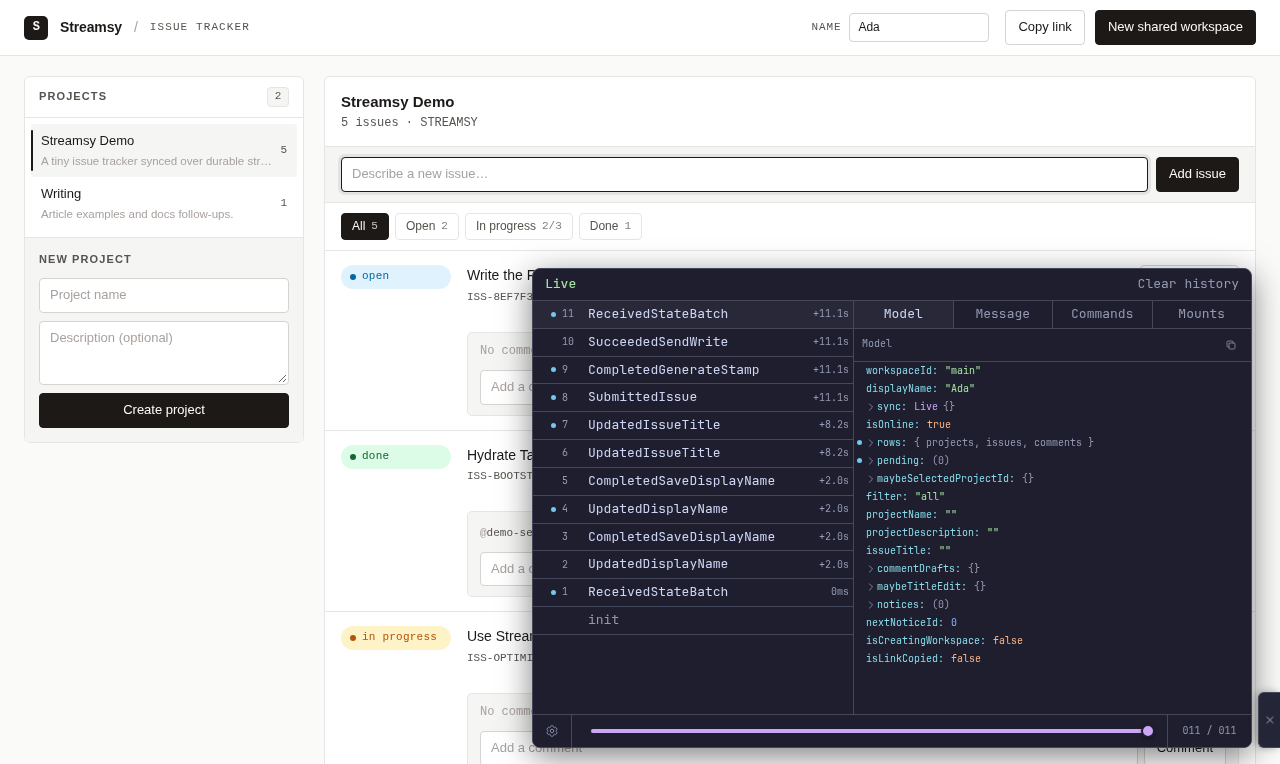
The screenshot shows the write from section 6. SubmittedIssue starts it, and the ReceivedStateBatch after SucceededSendWrite confirms it. The pending list is empty again.
The example folder has a .mcp.json file. It starts the Foldkit DevTools MCP server, so a coding agent can read the Model and the Message history of the running page.
{
  "mcpServers": {
    "foldkit-devtools": {
      "command": "bunx",
      "args": ["@foldkit/devtools-mcp"]
    }
  }
}
Test with stories and scenes
The tests run in Vitest with happy-dom and Foldkit's matchers. They need no server and no browser, because update and view are pure. Every side effect is a Command or a subscription, and a test gives its result as a Message.
bun run --cwd examples/issue-tracker-demo-foldkit test:unitA story test sends Messages to update, checks the Model and the Commands, and gives each Command its result Message. This story follows a new issue from submit to the txid on the stream.
test("a new issue is pending until its txid arrives on the stream", () => {
  story(
    update,
    given(live),
    message(Message.UpdatedIssueTitle({ value: "  Write tests  " })),
    message(Message.SubmittedIssue()),
    // ...
    Command.expectHas(SendWrite),
    Command.resolve(SendWrite, Message.SucceededSendWrite({ txid: "tx-1" })),
    // The server accepted the write, but the stream has not shown it yet.
    model((current) => expect(current.pending).toHaveLength(1)),
    message(
      Message.ReceivedStateBatch({
        changes: [upsertIssue(issue("issue_abcdef12", { title: "Write tests" }), "tx-1")],
        isUpToDate: true,
      }),
    ),
    model((current) => {
      expect(current.pending).toHaveLength(0);
      expect(current.rows.issues["issue_abcdef12"]?.title).toBe("Write tests");
    }),
  );
});
A scene test renders the view. It types, clicks and changes fields by their labels, resolves each Command, and checks the page. Subscription.emit stands in for the stream reader. This scene follows a status change that the work-in-progress rule refuses.
    scene(
      { update, view },
      given(live),
      change(label("Status for Fix the reader"), "in_progress"),
      Command.resolve(
        GenerateStamp,
        Message.CompletedGenerateStamp({ intent, stamp: stamp("tx-2") }),
      ),
      expect(pendingRow).toExist(),
      // ...
      Command.resolve(SendWrite, Message.FailedSendWrite({ txid: "tx-2", error: wipNotice })),
      expect(pendingRow).toBeAbsent(),
      expect(text(wipNotice, { exact: false })).toExist(),
      expect(label("Status for Fix the reader")).toHaveValue("open"),
Other tests cover the pure workspace functions, the batch-to-Message mapping and the JSON codec that keeps the Model across a reload. The server is the base app's server, so the base app's HTTP smoke test covers it.
Versions
Foldkit 0.169.0 and its tools ask for effect and @effect/platform-browser at exactly 4.0.0. The repository uses 4.0.5. The root overrides entry for effect gives one copy of Effect in the install and in the browser bundle. Bun warns about the @effect/platform-browser peer. The Vite plugin brings @effect/platform-node-shared@4.0.0 for its Node side only. Check these again when Foldkit or Effect releases.
Limits
- The Model holds every row of the workspace, and the view derives the lists on each render. This suits a demo workspace.
- Form fields are plain elements, not
@foldkit/uicomponents, so that the page keeps the base app's markup. - With two tabs open, a reload after an edit gives both tabs the Model of the tab that changed last.
- Development needs two processes: Vite and the base server.
- The other limits of the base app still hold.